Two changes this week, both from things you asked for.
Move many items at once
Moving items between your chests and your characters used to mean one item at a time. Now you can tick several, or all of them, and move them in one press. Thanks to @nashoba69 for asking.
From a chest (open the chest on the website):
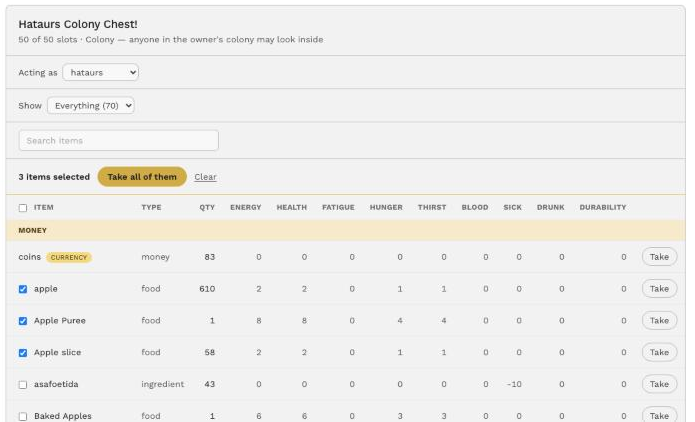
- To take items out: tick the items you want, or the box at the top of the list to select everything shown, then press Take all of them. They go to the character you’re acting as.
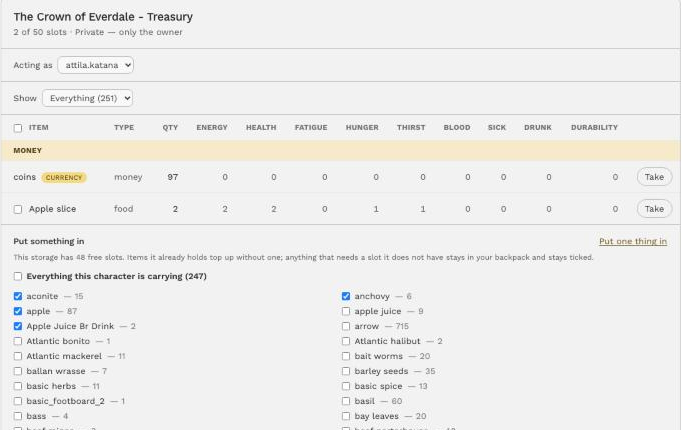
- To put items in: press Put several in at once, then tick items from your character’s inventory. The chest shows how many free slots it has before you press. Items it already holds just top up and don’t take a new slot.
From your inventory (Profile → Inventory):
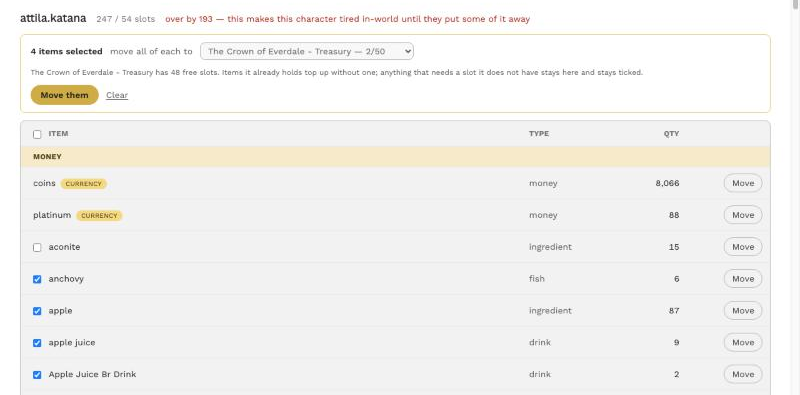
- Tick items on any of your characters.
- Choose where they go: one of your chests, or another of your characters.
- Press Move them.
How it works:
- Whole stacks. Each ticked item moves all of its amount, grades included.
- Up to 60 at once. If you’ve ticked more than that, press again for the rest.
- Coins are never offered for bulk moves, so a whole purse can’t go with a stray tick.
- The usual rules still apply to each item: the chest’s capacity, its reach, and whether it’s online. Anything that can’t move is listed by reason, for example “The chest is full: Iron Ore, Salt”. It stays ticked so you can try again, and everything else still goes.
Taking three items out of a chest at once:
Putting several in, with the chest’s free slots shown first:
From your inventory, sending four items to a chest:
Set Security from your Objects page
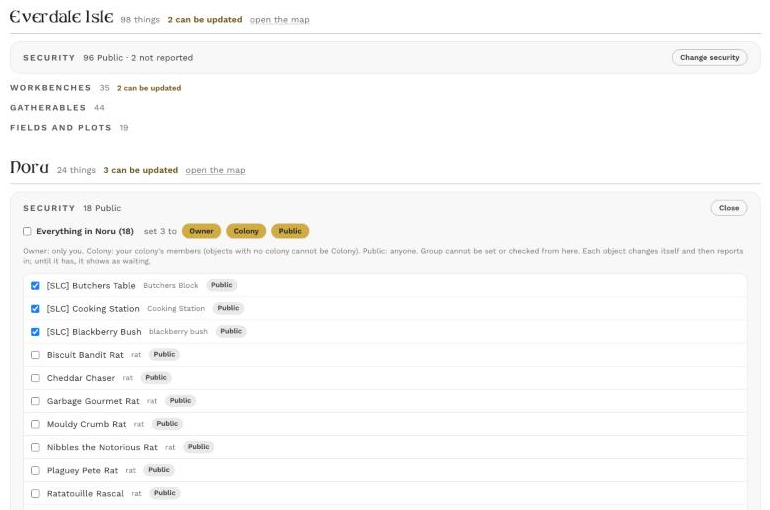
Your Objects page (Profile → Objects) lists what you have standing in each region, with a count of each Security setting. Now you can change Security there too, without walking to each object and opening its menu.
It works for:
- workbenches (the chicken coop included),
- fields,
- gatherable nodes (trees, reeds, ore veins and the rest),
- animal spawners.
To change it:
- Press Change security on a region.
- Tick the objects you want, or Everything in that region.
- Press Owner, Colony or Public.
The page sends the change to each object in-world. Each object shows as waiting until it confirms the change itself, so the page never claims a change that didn’t happen. If an object can’t be reached, the page says so.
A few things to know:
- Colony needs the object to know your colony. If it doesn’t yet, touch it once in-world and try again.
- A workbench in the middle of a craft can’t change. Wait until it’s idle.
- Your objects need the latest update first. Run your Mending Skep, and the new scripts arrive with everything else. Until an object has them, the page will tell you it didn’t change.
Group security is retired
Group security let in whoever was in the land’s SL group. That isn’t the same people as your colony, and nobody can check from the website who is in a group. So Group is going away.
When your objects update, anything set to Group moves to Colony if it knows your colony, or to Owner if it doesn’t. The object tells you in chat when it does this. You