If you have used My Recipe Book on the meter site, you know the shape of it: a list of what your character knows, a pop-up to read a recipe, and a separate page to edit the things you invented. It did the job for years.
Today it moves to the website, and it is a much bigger book. Sign in at slcoloniesroleplay.com, open your profile, and choose the new Recipe Book tab. It takes over from the old My Recipe Book, Edit Items and My Blueprints pages, brings them together as one book, and adds a good deal those pages never had: a search that looks inside ingredients, private notes in the margins, what a craft really pays under the new CXP rules, renaming an invention everywhere at once, and your own icons on the benches in-world.
As before, it is private to you: nobody else can open your book, read your notes, or see what goes into the things you have invented.
The book itself
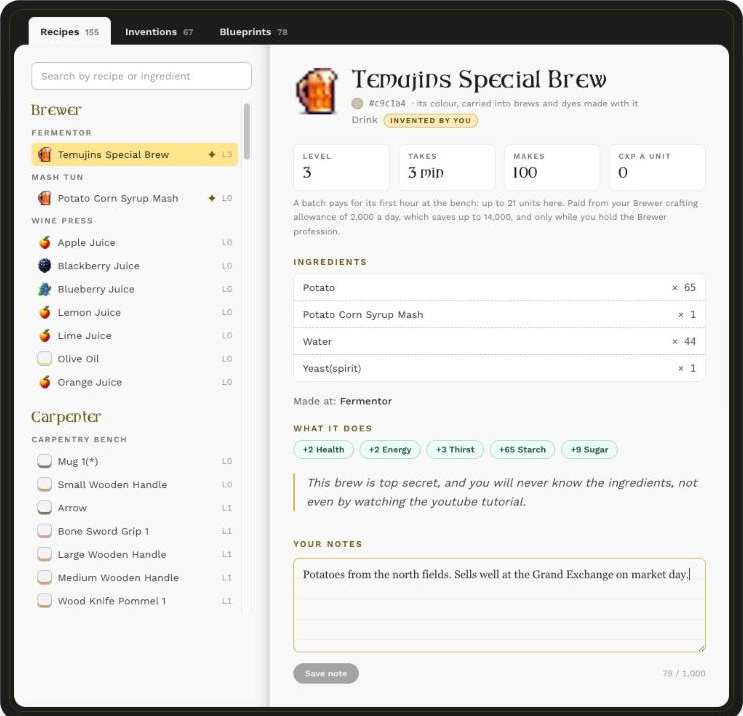
Pick a character, and their book opens: the index on the left page, the recipe on the right.
- Filed by profession and station. Brewer, Cook, Smith and the rest, each with its benches, so you can see at a glance what your Fermentor can make and what your Forge can.
- Search by recipe or by ingredient. Type blueberry and every recipe that uses one appears.
- Everything about each recipe: level, how long it takes, how many it makes, every ingredient and amount, where it is made, and what the finished thing does for you: health, energy, thirst and so on.
- Its colour. Each item’s colour sits beside its name, because it carries into the brews and dyes you make with it.
- What a craft really pays. The old pages showed a recipe’s CXP figure; the book shows what you will actually earn, under the new rules: a batch pays for its first hour at the bench, from your profession’s daily allowance of 2,000 (which saves up to a week), and half if you start it from the Scrying Stone. A player’s own recipe pays no more than the best official recipe at the same station. No surprises at collection time.
Your notes
Every recipe has a margin. Write where you find the ingredients, what it sells for, who keeps asking for it. Notes are yours alone, and a small mark in the index shows which recipes you have written on.
Dropping a recipe
Learned something you will never make? Remove from this book takes it out of your index, after asking you to confirm. The recipe stays in the game, and you can learn it again. You cannot drop a recipe you invented yourself, because there may be no way to learn it back.
Your inventions
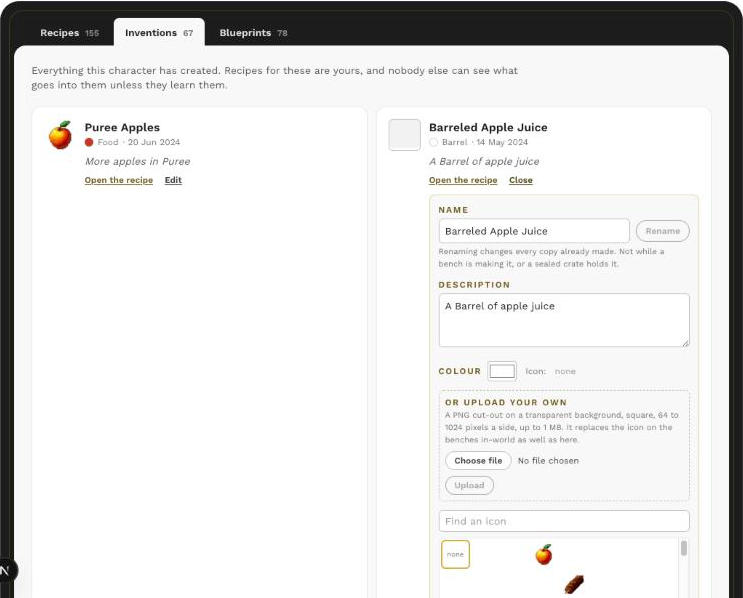
The Inventions tab lists everything your character has created, each with a link straight to its recipe. For an invention you can now:
- Rename it. The new name follows the item everywhere: every backpack, chest, recipe, market line and bench that holds it. Because of that, a rename is refused while a bench is making it, while a sealed crate holds it, or when another item already has that name.
- Change its description and colour.
- Choose its icon from the game’s library of more than two hundred, or upload your own: a square PNG with a transparent background, up to 1024 pixels a side and 1 MB. Your icon appears in the cooking and alchemy benches in-world as well as on the website.
Uploaded icons are listed for our staff, so please keep them suitable for everyone.
Blueprints
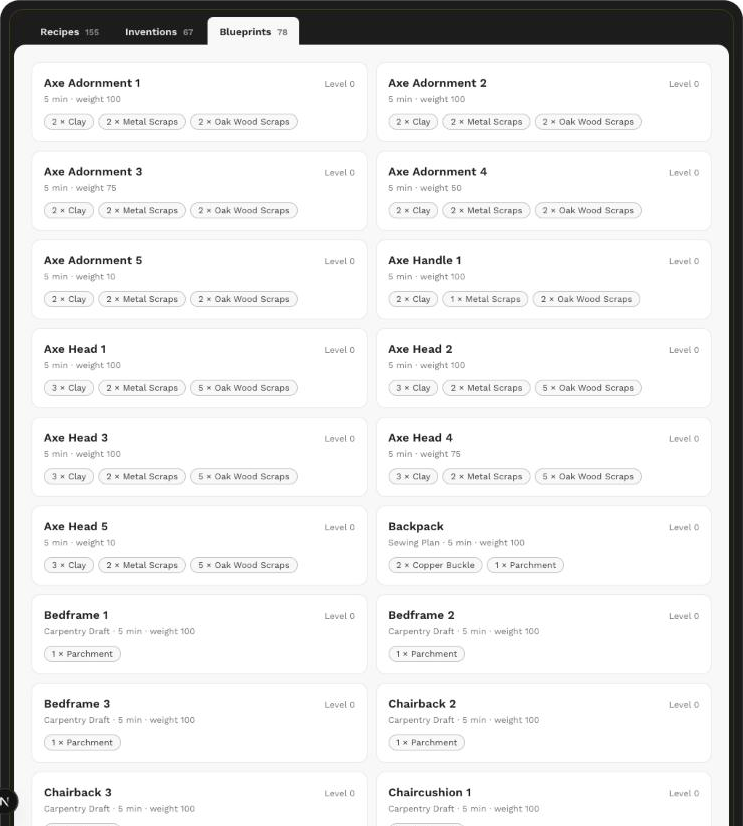
The Blueprints tab holds everything your character has learned at the Research Station, with its level, time, weight and parts.
One book per character
If you play more than one character, each has a book of their own. Switch between them at the top of the page.
Questions?
Reply below, or open a support ticket through the bot in-world. And if you find a recipe in your book that does not look right, tell us which one: the book reads straight from the game, so what you see is what the game knows.
Happy crafting.